Runs in your browserDesktop: Chrome, Edge, Safari, Firefox
PhotoMentor Bulk Culler is a browser-based AI culling tool for photographers. Its AI sort puts every photo of a shoot into Keep, Review and Rejected, groups similar frames, ranks the keepers against your own brief and explains why each finalist was chosen. Camera RAW files are read in your browser and never uploaded. Your picks, stars and colour labels go back to Lightroom Classic or Capture One as XMP sidecars.
Four steps, the same ones you see in the app. After the upload, processing continues on PhotoMentor's servers even if you close the browser tab.
1
Upload the shoot
Choose a folder or files, or drag a whole card folder into the browser: JPG, PNG, WebP or HEIC and camera RAW. Only a reduced copy of each photo is uploaded. Sidecars, videos and system files are skipped and listed.
2
AI sort
The AI sort puts every photo into Keep, Review or Rejected and groups similar frames. Choose Creative or Event mode before it starts. Every status can be changed.
3
Goal & rating
Optionally describe the theme and audience in your own words and set the weights in percent. The AI rating combines them with image quality, before any critique. A goal can be saved for the report; it does not change the rating.
4
Finalists
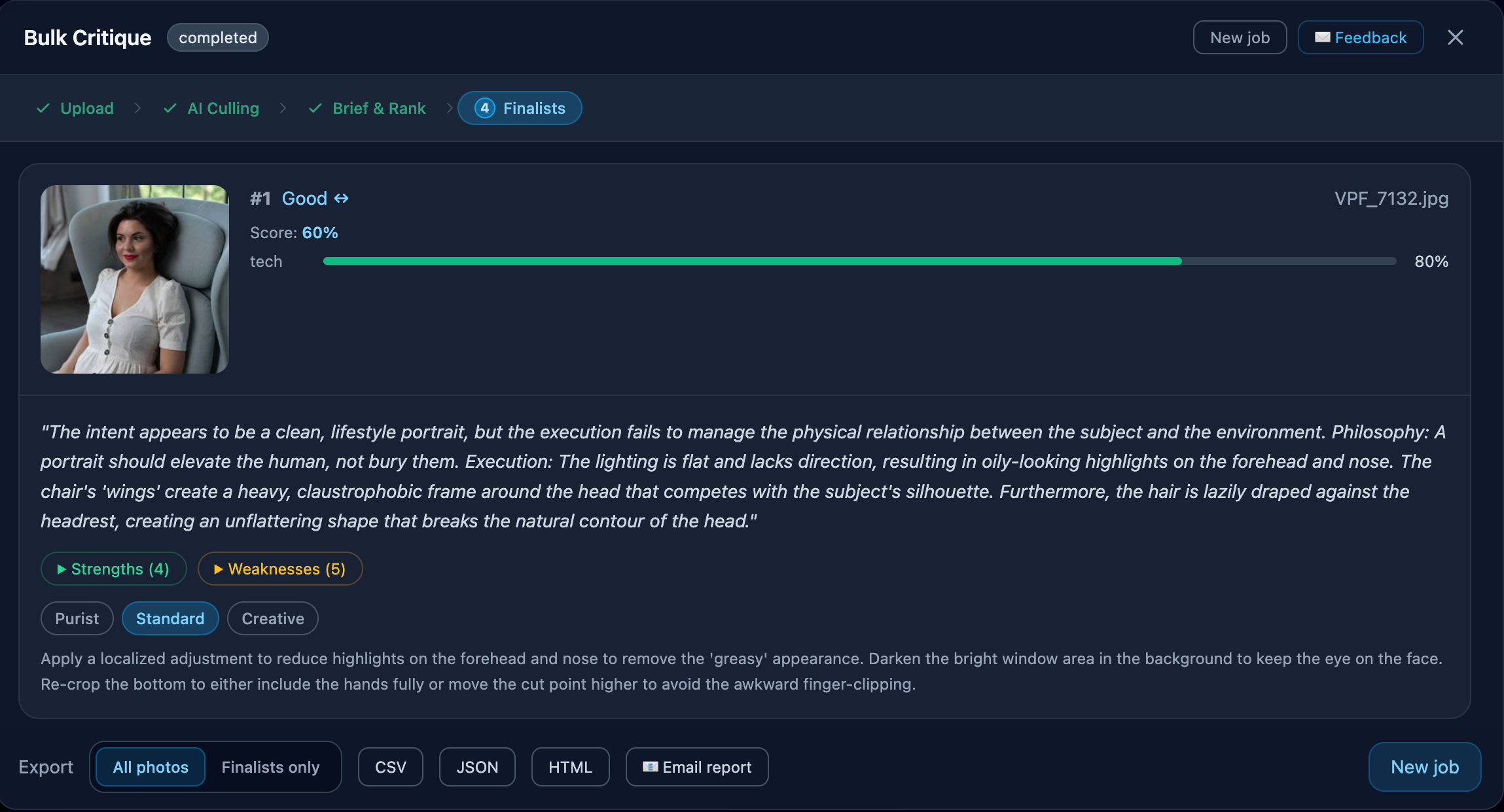
Choose how many finalists you need, up to 100. Each one shows why it was chosen, and the top finalists get a detailed critique automatically.
Two culling modes: Creative and Event
A blurred face is a mistake in a news photo and may be the whole point of a night street photograph. You choose the mode for each session.
Creative / personal work
For personal projects, series, travel, street and fine art. Silhouettes, motion blur, fog, grain and unusual exposure are treated as possible intent: on their own they send a photo to Review at worst, never to Rejected. The AI shows which deliberate choices it recognised, and a rejection has to name an actual defect.
Event / reportage
Classic technical triage for events and reportage. Missed focus, closed eyes and accidental frames go to Rejected, so you spend your time on the frames that can be delivered.
Drop a card folder as it is. Your browser extracts the preview that the camera embedded in each RAW file and uploads only a reduced copy, long side up to 1024 px. RAW files and full-size originals never leave your computer.
Supported RAW formats: CR2 and CR3 (Canon), NEF and NRW (Nikon), ARW (Sony), RAF (Fujifilm), ORF (Olympus / OM System), RW2 (Panasonic), PEF (Pentax), SRW (Samsung), DNG and several more.
RAW+JPEG pairs count as one photo.
Sidecars, videos and system files on the card are skipped and listed after the upload.
Not supported: MRW, X3F, CRW and a few older RAW formats. They are listed as unsupported instead of failing later.
Similar frames, reviewed together
Bulk Culler groups visually similar frames, such as several shots of the same moment or related compositions of one scene, so you can compare them side by side. Each photo is still assessed on its own, and a Similar frames filter works together with the Keep, Review and Rejected filters.
• Keyboard shortcuts: K, R, X and F for Keep, Review, Reject and Finalist, arrows to move
• Stars 0–5 and colour labels
• Multi-select and undo
• Side-by-side comparison and "keep the best of a group"
Finalists with reasons, and detailed critique
Choose how many finalists you need, up to 100: presets of 10, 25 or 50, or a share of the session, for example 25 for a photobook. Pin the photos you want regardless of rank.
Every finalist shows why it was chosen. The rank combines technical quality with how well the photo fits your brief, and it is computed during selection, before any critique, so a critique explains a photo without reshuffling your shortlist.
Critique tone, Brutal or Supportive, changes only the wording of the critique, never the selection.
Detailed critique
Detailed critique runs automatically for 3 finalists on Free, 5 on Pro and up to 50 per session on Pro Workflow. Pinned finalists come first, then the rest by rank.
Any other photo can be critiqued on request: unlimited on Pro and Pro Workflow, 1 credit on Free.
Finalist view, recorded with the previous version of the interface.
Back to Lightroom Classic or Capture One via XMP
Export statuses, stars, colour labels and keywords as XMP sidecars, the metadata files that Lightroom Classic and Capture One read next to your RAW files.
Chrome and Edge: Bulk Culler writes the sidecars straight into your shoot folder.
Existing sidecars are merged: develop settings saved in them stay, and so do stars and labels unless you choose to overwrite them. Save metadata to files in Lightroom first: changes kept only in the catalog are replaced when Lightroom reads the sidecars.
Safari and Firefox: download the sidecars as a ZIP.
Your photo files are never modified. JPEG, HEIC and DNG files keep their metadata inside the file and get no sidecar: the free PhotoMentor plug-in for Lightroom Classic marks them in the catalog, Pick and Reject flags included.
Every session can be exported as a CSV, JSON or HTML report, for all photos or finalists only, or emailed to you.
Find any photo again, across shoots
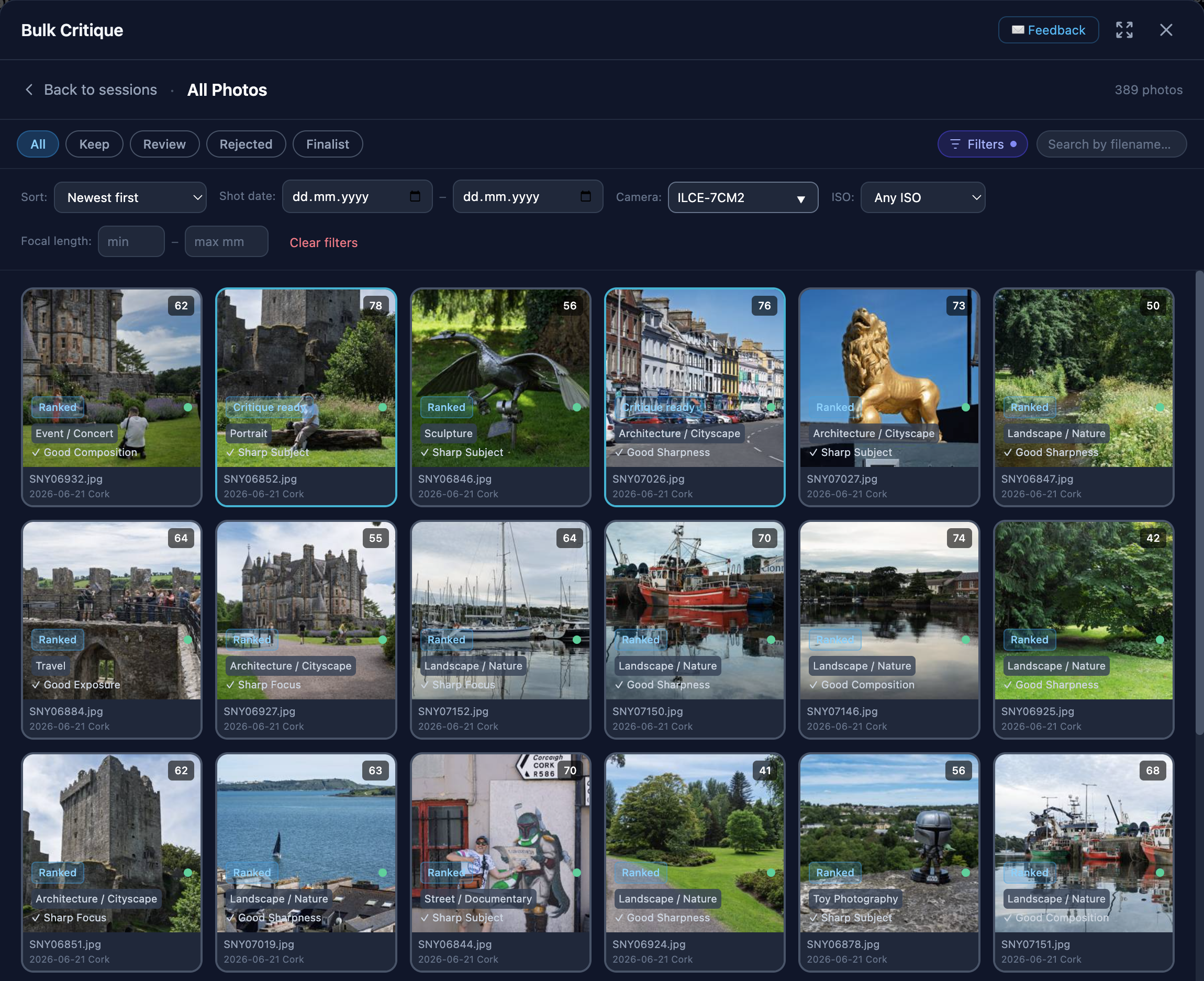
All Photos shows the photos from all your sessions in one place, with filters for status, shot date, camera, ISO and focal length.
Search by description, such as "fog on a bridge", or pick a photo and use Find similar.
On Pro and Pro Workflow, culled shoots stay searchable after their uploaded previews expire: up to 10,000 photos on Pro and 200,000 on Pro Workflow. Pro Workflow can also add older shoots to search without culling them.
All Photos, recorded with the previous version of the interface.
Collections across shoots
Gather photos from different shoots into collections, such as "Portfolio 2026": 3 collections on Pro, unlimited on Pro Workflow. A collection stores references to your photos, not extra copies.
A package of your original files
In Chrome or Edge, select photos and assemble a folder with their original files from your own disk: byte-for-byte copies verified by SHA-256, with paired RAW/JPEG files and sidecars, plus a manifest of anything that was not found. Originals are read locally and never uploaded.
Privacy in brief
• Only reduced previews (long side up to 1024 px) are uploaded. RAW and full-size files never leave your computer.
• Your photos are not used to train AI models.
• PhotoMentor never modifies, renames or deletes your photos. It writes only .xmp sidecars, and only when you ask.
• To find your files again for XMP export and original-file packages, Bulk Culler stores the path relative to the folder you chose, the file size, the modified time and a SHA-256 fingerprint, never the full path on your computer.
• The text of your searches is not stored or logged.
• You can turn the search archive off and delete it entirely.
• Uploaded previews are deleted when a session expires, after 7 days on Free, 30 on Pro and 90 on Pro Workflow, unless you save the session.
• On Free, the session itself, with its thumbnails, AI results and your ratings, is deleted 30 days after its previews expire, unless you upgrade.
A Pro session counts when its AI sort starts, not when you create a draft. On Free, a session is deleted 30 days after its previews expire unless you upgrade; nothing is charged automatically.
Limitations
• Needs an internet connection. The analysis runs on PhotoMentor's servers, so there is no offline mode.
• Desktop browser only. There is no desktop app, and Bulk Culler is not part of the PhotoMentor Android app.
• Writing into folders needs Chrome or Edge. Safari and Firefox get XMP sidecars as a ZIP.
• Original-file packages need Chrome or Edge.
• Some RAW formats are not supported: MRW, X3F, CRW and a few older formats.
• HEIC files on their own need a browser that can open HEIC, such as Safari.
• Not a permanent photo library. Uploaded previews are kept for a limited time that depends on your plan.
• AI suggestions, not decisions. The AI can be wrong; you make the final call and can change any status.
Plan the cull before choosing the tool
Use practical workflows to define your selection criteria, then compare products by verified processing, file, review and export behaviour.
Photo culling is choosing the keepers from a shoot: rejecting unusable frames, comparing similar ones and picking the photos worth editing or delivering. AI culling does the first pass for you and leaves the final call to you. In PhotoMentor Bulk Culler, the AI sort puts every photo into Keep, Review or Rejected, groups similar frames and ranks the keepers against your brief.
Does PhotoMentor Bulk Culler upload my RAW files?
No. Your browser reads the preview that the camera embedded in each RAW file and uploads only a reduced copy, at most 1024 pixels on the long side. RAW files and full-size originals never leave your computer. Supported RAW formats include CR2, CR3, NEF, NRW, ARW, RAF, ORF, RW2, PEF, SRW and DNG, and a RAW+JPEG pair counts as one photo.
Can I send my picks and ratings to Lightroom Classic or Capture One?
Yes. Bulk Culler exports statuses, star ratings, colour labels and keywords as XMP sidecars that Lightroom Classic and Capture One read. In Chrome and Edge it writes them straight into the shoot folder and merges them with existing sidecars, keeping the develop settings stored there and, unless you choose to overwrite them, the stars and labels. Save metadata to files in your editor first (in Lightroom Classic: Metadata → Save Metadata to Files): changes that exist only in the catalog are replaced when the editor reads the sidecars back. Other browsers get a ZIP of sidecars. Your photo files are never modified. JPEG, HEIC and DNG files keep their metadata inside the file, so instead of sidecars you get a list of their file names to filter in Lightroom.
Will it reject my intentional motion blur or silhouettes?
Not in Creative mode. Choose Creative / personal work before the AI sort, and silhouettes, motion blur, fog, grain and unusual exposure are treated as possible intent: on their own they send a photo to Review at worst, never to Rejected, and the AI shows which deliberate choices it recognised. Event / reportage mode applies classic technical triage, where missed focus, closed eyes and accidental frames are rejected.
How many photos can I cull in one session?
Up to 2,000 photos per session on Pro and Pro Workflow, and up to 1,000 in your free first shoot on the Free plan. Pro includes 5 sessions a month; Pro Workflow has no monthly session limit.
Is there a free plan?
Yes. On the Free plan your first shoot is free: one Bulk Culler session of up to 1,000 photos, with automatic detailed critique for 3 finalists and 7 days of preview storage, and no credit card required. Pro costs $5 a month or $40 a year for 5 sessions a month of up to 2,000 photos each, and Pro Workflow costs $15 a month or $120 a year with no monthly session limit.
Is the first shoot really free?
Yes, and it is a permanent part of the Free plan: one culling session of up to 1,000 photos, RAW included (a RAW+JPEG pair counts as one photo). You sign in with Google, no credit card is needed and nothing is charged automatically. It includes the AI sort in Event / reportage or Creative mode, similar frames, ranking of the keepers by your theme and audience, up to 100 finalists, stars and colour labels, XMP export to Lightroom Classic and Capture One, and automatic detailed critique for 3 finalists. On Free, previews are kept for 7 days, and the session is deleted 30 days after they expire unless you upgrade. A critique of any other photo costs 1 credit. The search archive, collections and adding older shoots to search are not part of Free. For more shoots, Pro includes 5 sessions a month of up to 2,000 photos each, and Pro Workflow has no monthly session limit.
Does it work offline?
No. The AI analysis runs on PhotoMentor's servers, so Bulk Culler needs an internet connection. Only reduced previews are sent; your full-size and RAW files stay on your computer. After the upload, processing continues on the server even if you close the browser tab.
How is it different from a desktop culling app?
Bulk Culler runs in the browser, so there is nothing to install and the same account works on any desktop computer. Desktop culling apps typically analyse files on your computer and can work offline; Bulk Culler analyses reduced previews on PhotoMentor's servers and needs an internet connection. It also ranks the keepers against a written brief with adjustable weights and shows the reasons each finalist was chosen.
How does Bulk Culler choose finalists?
Finalists are the highest-ranked keepers. The rank combines technical quality with how well each photo fits the theme and audience of your optional brief, using weights you set in percent. It is computed during selection, before any detailed critique, and every finalist shows the reasons it was chosen. You can change any status and decide what stays.
Can I search my photos across shoots?
Yes. Every culled shoot is searchable in All Photos: describe what you are looking for, such as "fog on a bridge", or pick a photo and use Find similar. On Pro and Pro Workflow, photos stay searchable after their uploaded previews expire, and Pro Workflow can add older shoots to search without culling them.
Does PhotoMentor change or delete my photo files?
No. PhotoMentor never modifies, renames or deletes your photos. When you export ratings, it writes only .xmp sidecar files, and only when you ask. Uploaded previews are deleted automatically when a session expires, after 7 days on Free, 30 days on Pro and 90 days on Pro Workflow, unless you save the session.
Are my photos used to train AI models?
No. PhotoMentor does not use your photos to train, fine-tune or improve AI models. Reduced previews are sent to the Google Gemini API only to analyse your session.